
GST 2A/2B Reconciliation
Drop in one or more months of GSTR-2A/2B and your purchase register — matched using the GST portal's own 7-parameter rules and formulas, merged across periods automatically.
How it works
- Drop in one or more months of GSTR-2A/2B — JSON or Excel, straight from the GST portal. Multiple months merge into one reconciliation automatically, de-duplicating invoices that appear in more than one month's snapshot.
- Drop in your purchase register — any CSV or Excel export, with a column-matching step if it can't be auto-detected.
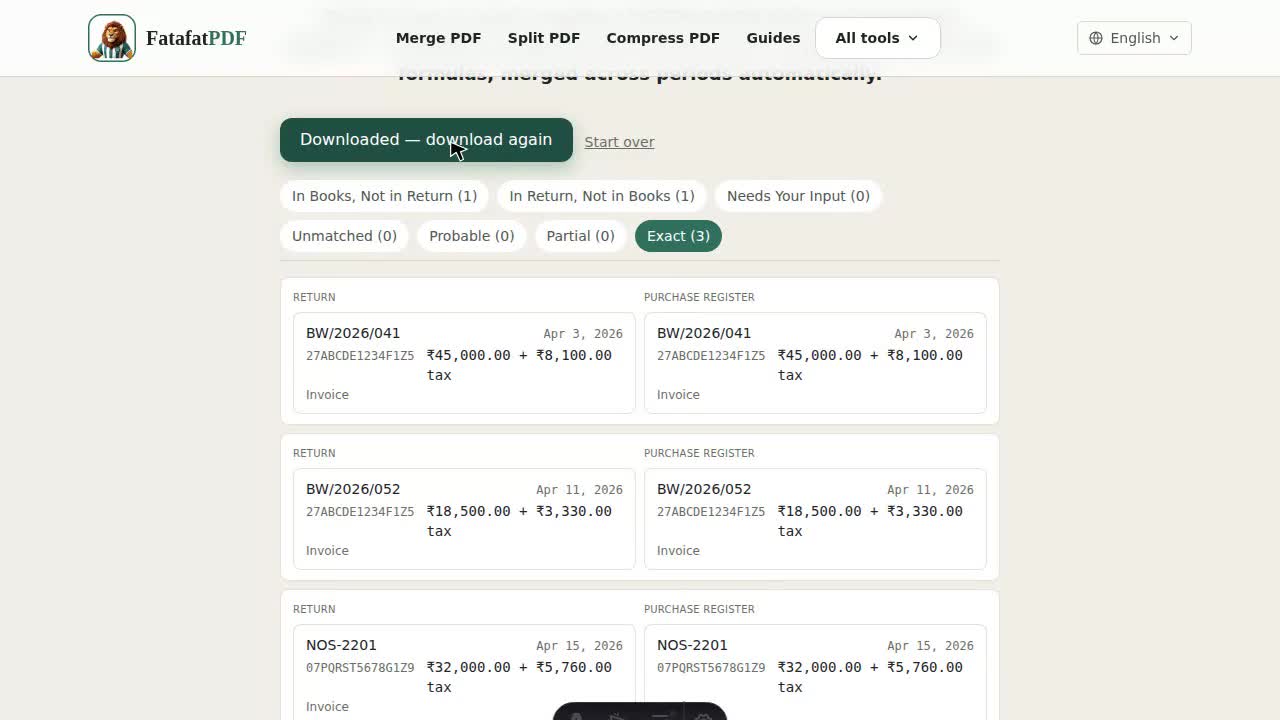
- Review the results, sorted into the same match categories the GST portal's own rules define.
- Download a full reconciliation report as an Excel workbook.
Why does this handle multiple months at once?
The GST portal only lets you download GSTR-2A/2B one return period at a time — there's no way to pull a full financial year in a single request. This tool accepts whatever your accounting software already exports, and lets you drop in multiple months' 2A/2B files together — merged into one reconciliation instead of running the comparison twelve separate times and combining the results by hand.
What matching logic does this use?
The same rules and formulas the GST portal itself defines for a valid match: GSTIN, document type, document number, document date, taxable value, total tax, and tax-head-wise amounts (IGST/CGST/SGST/Cess as one combined parameter) — 7 parameters in total. A document number like "INV-001" and "INV0001" is treated as the same invoice, the same approximation the portal's own rules allow for.
Do I upload a JSON file or an Excel file?
Either — GSTR-2A and GSTR-2B can both be downloaded from the GST portal as JSON or Excel, and this tool reads both formats directly.
How does the multi-month merge work?
Drop in more than one month's GSTR-2A/2B file and the tool merges them into one financial-year view, de-duplicating any invoice that appears in more than one month's snapshot (2A is dynamic — a late-filing supplier can cause the same invoice to show up again in a later month). If an invoice's details changed between snapshots, the later month's version is kept.
What does "In Purchase Register, Not in Return" mean, and why does it matter?
It means you've booked a purchase with input tax credit, but your supplier hasn't reported the matching invoice in their own GST return. Under Rule 36(4), ITC without a supporting return entry is exactly what a GST audit questions first — this is usually the single most important category to review.
Is my GST data uploaded anywhere?
No — every file you drop in is parsed and matched entirely in your browser using JavaScript. Nothing about your purchases, your suppliers, or your GSTINs is ever sent to a server.